Tampilkan postingan dengan label galaxy. Tampilkan semua postingan

How to Install ClockWorkMod Recovery on Your Samsung Galaxy Note (GT-N7000) [Easy Steps]

Posted by Unknown Sabtu, 27 April 2013 0 komentar
CWM Recovery aka ClockworkMod Recovery v6.0.1.2 is now available for Galaxy Note GT-N7000.  We at LIVETECHOHOLIC time to time cover custom ROMs for Galaxy Note N7000 which require a custom recovery such as CWM recovery for installation procedure. In fact, many Android user prefer custom recovery over stock recovery even when they don’t want to install custom ROM because it comes with many more features and capabilities that stock recovery can’t offer. We are here to help you to install ClockworkMod Recovery v6.0.1.2 on your Galaxy Note N7000. This is an easy to follow guide that allow even an Android newbie to install CWM recovery easily. You probably already know that installing CWM recovery will void your manufacturer warranty and to get back warranty you should install an official firmware (to get stock recovery back) as well as reset the flash counter (only for Samsung devices) using TriangleAway app. This custom recovery installation tutorial that allow you to install CWM recovery v6.0.1.2 on Galaxy Note N7000 require a rooted device.

Method:


1) Download ROM Manager from play store. 

Click here to Download. 

2) Goto Recovery Setup.

3) Install or Update Recovery >> Clock Work Mod Recovery...

thats it...

Your CWM Recovery will be Downloaded and Installed Automatically.


If you are unable to perform the above operations than just comment on the post and we will post to perform with another method....

Warning!
We at LIVETECHOHOLIC produce tutorial to help out fellow Android users but all this guide are educational purpose only. You should try this guide at your own risk. Neither we nor the developer should be responsible if  your Android device experience a damage after following this tutorial. Also remember,this guide is only applicable for Galaxy Note N7000. Don’t try this guide in any other Android device. It may hard brick your device.

Sharing is Caring...
  

Baca Selengkapnya ....

How to Root Samsung Galaxy Note (GT-N7000) [Quick & Easy Steps]

Posted by Unknown Kamis, 18 April 2013 0 komentar
Rooting your phone means:
  • You are a superuser of your phone.
  • You can install Custom ROMs and Enjoy the features which the manufacturer will not provide you.
  • Gaining root access etc.


Disclaimer:

Please note that rooting your Galaxy Note will certainly void its warranty and if you are not careful enough, it might also put your device in risk. We, at Live Wired, or the developers of this method will not, in any case be liable to any mishap. Proceed only if you understand what you are about to do. Further, the procedure given below is meant only for the international model of the Galaxy Note with model number GT-N7000. Trying it with a different phone or model might produce bizarre results.
Before ROOTING your phone you must note that your Warranty would be void.
Pre-requisites
1) Install USB Driver for Galaxy Note on the computer.
2) Enable USB Debugging Mode. [Press Menu>> Settings>> Developers Check USB Debugging Mode is turned on.] 
In Jelly Bean the Developer option is hidden to provide users with better navigation, You can enable it. Just Go to Settings>>About Phone>> Then Click on BUILD NUMBER option 7 times to show up the Developer options.
Then follow the 2nd step to turn it on.
3) Create a backup of all data of the device.(Precautionary Step)
4) The phone should be factory unlocked.
5) Ensure that the battery of the Galaxy Note has more than 80 per cent of charge.
6) The phone will lose manufacturer's warranty once it is rooted, but users can regain the warranty by unrooting the device.    
7) The root method below is only compatible with Samsung Galaxy Note N7000 running on Android 4.1.2, applying the method on incorrect variant might brick the device.

Required Files:-
1) Download The Package File (CLICK HERE)

(Do NOT EXTRACT this file)

Method To Root Galaxy Note via Stock Recovery:-
This is the easiest way we found to root your phone.
Follow the below steps properly:
  1. Download the above given file (do not extract).
  2. Copy the zip file to the external SD card memory on your Galaxy Note.
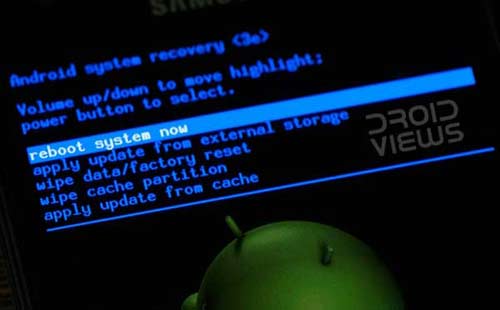
  3. Turn off the phone and boot it into recovery mode. If you have a smartphone, you can do it this way: press and hold the Volume Up+Home buttons together and then hold the Power button till the screen turns up and the Samsung logo blinks for two times. Release all the buttons till you see a black screen with green Android bot and Blue text.
  4. Using the volume keys for moving up and down, scroll down to “apply update from external storage”. Press the power button and navigate to the PhilZ-cwm6-XXLSZ-OXA-4.63-signed.zip file and select it. Confirm your choice if asked.
  5. When the installation is finished, select “reboot system now” option.
When the phone boots up, you will see “Android is upgrading…” message on your Note’s screen. When the phone is finally ready to be used, open app drawer and look for an app called SuperSU. Open the app and update the binary if asked to do so. Done!
First time Rebooting may take some more time than the normal.
If you found the superuser app than you have successfully rooted your phone. 

After rooting what to do next, How to install Custom Recovery etc....
Soon we are going to post about it..!
Just follow our blog to get updated.

Comment if you have any problem or have any Question.
We will get back to you soon..


Baca Selengkapnya ....
Trik SEO Terbaru support Online Shop Baju Wanita - Original design by Bamz | Copyright of android blackberry.